
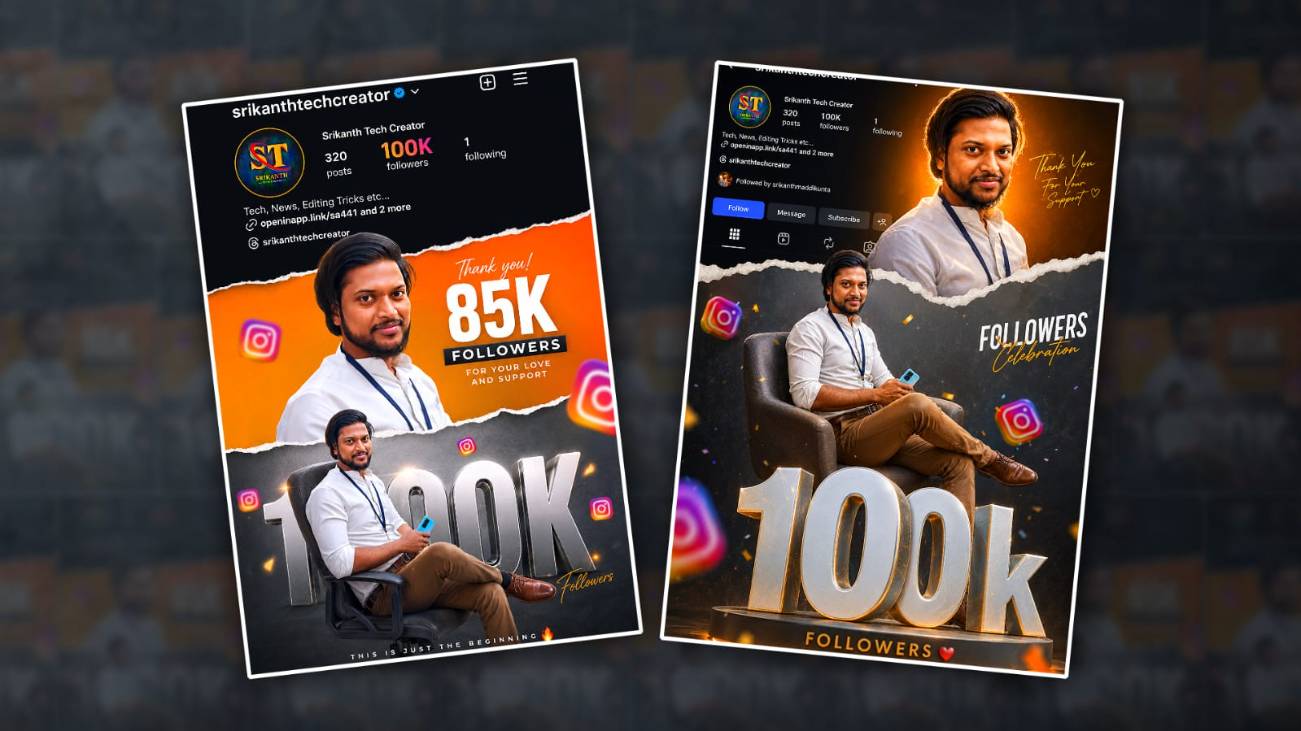
Introduction to Followers Celebration Photo Editing
Social media has become a huge part of daily life, and gaining followers is now seen as a special achievement for creators, influencers, gamers, bloggers, and even small businesses. Because of this trend, followers’ celebration photo editing has become very popular on platforms like Instagram, Facebook, TikTok, and YouTube. People love sharing creative images showing milestones such as 1K, 10K, 100K, or even 1 million followers. Gemini AI is one of the latest AI tools that helps users create professional and eye-catching celebration edits quickly without advanced design skills. With the help of AI-generated backgrounds, stylish text effects, and realistic editing features, anyone can create trending followers celebration photos in just a few minutes.
Why Gemini AI is Popular for Photo Editing
Gemini AI is becoming popular because it offers smart editing features that make photo creation simple and fast. Unlike traditional editing apps that require manual work, Gemini AI understands prompts and generates creative designs automatically. Users only need to upload a photo and describe the type of followers’ celebration image they want. The AI can create glowing effects, luxury backgrounds, golden themes, social media-style templates, and modern typography instantly. Many creators prefer Gemini AI because it saves time while still delivering high-quality results that look professional enough for viral social media posts.
Choosing the Right Photo for Editing
The first step in creating a trending followers celebration photo is selecting a high-quality image. A clear portrait with good lighting works best because AI tools can easily detect facial features and improve the overall quality. Most creators choose stylish poses, smiling portraits, or confident expressions for celebration edits because these images attract more attention online. It is also important to avoid blurry or low-resolution photos since they reduce the final editing quality. If possible, use a photo with a clean background so Gemini AI can separate the subject more accurately and apply creative effects smoothly.
Writing the Perfect Gemini AI Prompt
Prompts are the most important part of creating AI-generated edits because Gemini AI works based on user instructions. A detailed prompt helps the AI understand the style, mood, and design you want. For example, users can write prompts like “Create a luxury Instagram followers celebration photo with neon lighting, glowing golden text, modern social media style, and 100K followers achievement background.” Adding details about colours, lighting, outfits, and background themes can improve the final result significantly. Trending edits usually include cinematic lighting, premium textures, shiny effects, and social media-inspired layouts that make the image look more engaging.
Creating Trending Background Designs
Background design plays a major role in followers’ celebration photo editing because it creates the overall visual impact. Most trending celebration photos use modern urban backgrounds, luxury rooms, golden particles, digital screens, balloons, fireworks, or abstract glowing lights. Gemini AI can generate these backgrounds automatically based on prompts. Many creators currently prefer black and gold themes because they give a premium and viral appearance. Neon blue, purple, and pink are also widely used in Instagram-style edits. Choosing a stylish background helps the image stand out and increases the chances of getting more likes, shares, and comments on social media platforms.
Adding Followers Count and Stylish Text
The followers count is the main highlight of celebration editing; the text design should look bold and attractive. Gemini AI can generate modern typography with glowing effects, 3D styles, metallic textures, and shadow designs. Popular text examples include “1K Followers,” “10K Family,” “100K Strong,” or “Thank You for the Love.” Many editors place the text near the centre of the image or behind the subject to create depth. Using large fonts with cinematic effects makes the celebration look more exciting and professional. Some creators also include their username or social media handle to make the design more personalised.
Enhancing the Image with AI Effects
One reason why Gemini AI edits look professional is the advanced enhancement system. The AI can automatically improve skin tones, sharpen facial details, adjust lighting, and add cinematic colour grading. Trending edits often use glow effects, lens flares, spark particles, and soft shadows to create a premium look. Some users prefer realistic edits while others choose artistic and futuristic themes. Gemini AI allows flexibility for both styles. By experimenting with different prompts and effects, creators can develop unique celebration designs that match their personality and content style on social media.
Making the Edit Look Viral and Attractive
To create a truly trending followers celebration photo, the design should look visually engaging and modern. Viral edits usually follow current social media aesthetics, including luxury themes, clean layouts, dramatic lighting, and realistic AI enhancements. Many successful creators use minimal but powerful designs instead of overcrowded elements. Keeping the focus on the face and followers count helps the image look more professional. Bright highlights and contrast also help attract attention when people scroll through feeds quickly. The more visually striking the image looks, the higher the chance it will gain engagement and become popular online.
Exporting the Final Photo in High Quality
After completing the editing process, exporting the image in high quality is very important. A low-quality export can ruin all the effort put into the design. Gemini AI usually allows users to save images in HD or ultra-HD resolution, which is perfect for Instagram posts, YouTube thumbnails, Facebook covers, and WhatsApp status updates. Before posting, creators should check the sharpness, text alignment, and overall balance of the design. Some users also use additional apps for final adjustments, like brightness correction or adding extra filters. A polished final image always performs better on social media platforms.
Best Platforms to Share Followers Celebration Edits
Once the follower’s celebration photo is ready, sharing it on the right platforms can increase visibility and engagement. Instagram is one of the best places for these edits because users enjoy visual content and milestone celebrations. Facebook, TikTok, Pinterest, and YouTube community posts are also effective for sharing creative follower achievement designs. Many creators add trending hashtags related to followers’ milestones and AI editing to reach a larger audience. Captions like “Thank you for supporting my journey” or “New milestone unlocked” make the post feel more emotional and authentic, which encourages followers to interact with the content.
Conclusion
Trending followers celebration photo editing in Gemini AI is becoming one of the most exciting ways to celebrate social media growth creatively. With smart AI tools, users can create professional-looking edits without needing advanced graphic design experience. From generating stylish backgrounds to adding cinematic effects and modern typography, Gemini AI makes the entire editing process faster and easier. By choosing the right photo, writing detailed prompts, and following modern design trends, anyone can create eye-catching celebration images that attract attention online. As AI editing technology continues to grow, followers’ celebration edits will become even more creative, realistic, and popular across social media platforms.
Prompt
Instagram milestone poster celebrating 100k followers. The main subject (Luis) is stylishly posed in two different positions – one a full-body seated pose above large 3D metallic “100k” text with floating Instagram icons, and the other a half-body stylised photo above with a torn paper effect transitioning between an orange gradient and a grey background. The top section shows an Instagram profile interface with the username, “Your Username”, follower count 100k, bio, and icon. In both photos, the boy is looking directly at the camera.
