
Table of Contents
-
Introduction: Why Gemini AI Photo Editing is Taking Off
-
What Is Gemini / Nano Banana & Its Image Editing Capabilities
-
Key Features & Strengths of Gemini AI for Photos
-
Major Trends Driving Gemini AI Photo Editing in 2025
-
Viral Prompt Ideas & Styles You Can Try
-
How to Use Gemini AI for Photo Editing: Step‑by‑Step Tips
-
Challenges, Limitations & Ethical Concerns
-
Comparisons: Gemini vs Other AI Photo Tools
-
Use Cases & Real‑World Examples
-
What’s Next: What to Watch for in Gemini’s AI Image Future
-
Conclusion
1. Introduction: Why Gemini AI Photo Editing is Taking Off
Over the past year, AI-assisted image editing has surged from niche experiment to mainstream creative toolkit. Among the latest breakthroughs, Google’s Gemini AI (especially under its “Nano Banana” branding) has emerged as one of the most buzzed-about tools in 2025.
What’s driving this momentum? A few factors:
-
Users crave creative transformations—reviving old photos, changing styles, and making fantasy portraits.
-
AI models have matured to better preserve identity (faces, expressions) while enabling dramatic stylisation.
-
Social media dynamics reward novel and “wow” visual content—Gemini’s transformations fuel viral sharing.
-
Accessibility: what once required expert Photoshop skills is now possible via simple text prompts or conversational interfaces.
In this article, we’ll explore the best trending Gemini AI photo editing styles, show how to use them, and map out where this visual revolution might head next.
2. What Is Gemini / Nano Banana & Its Image Editing Capabilities
2.1 The Gemini / Nano Banana Ecosystem
-
Nano Banana is the codename for the Gemini 2.5 “Flash Image” model. Wikipedia
-
Officially launched in August 2025 and integrated into the Gemini app, AI Studio, and related tools. Wikipedia+2Android Central+2
-
Its debut substantially increased Gemini app adoption: Google claims over 10 million new users were added because of Nano Banana, with over 200 million image edits performed early on. Android Central+2Wikipedia+2
2.2 Core Editing Capabilities
-
Prompt-based editing: You upload a photo and provide natural-language instructions (e.g., “make the background misty forest,” “turn this into 90s Bollywood style,” etc.).
-
Subject consistency: It attempts to keep the face/identity stable across transformations. Wikipedia+2Android Central+2
-
Multi-image fusion: It can combine multiple images to produce a unified output. Wikipedia
-
World knowledge & context-aware changes: The tool understands input prompts in context and can apply changes more intelligently (e.g. style, lighting, cultural cues) rather than purely local edits. Wikipedia
-
SynthID watermarking: Output images may carry invisible watermarks or signals to mark them as AI-generated. Wikipedia
These capabilities set the stage for the creative trends and viral visuals we see flooding social feeds in 2025.
3. Key Features & Strengths of Gemini AI for Photos
Before diving into trends, it’s useful to understand the strengths (and sometimes tradeoffs) that make Gemini AI stand out.
3.1 Strengths
-
Ease & accessibility
You don’t need a deep editing background—just upload a decent photo and type what you want. This democratises creative transformations. -
Speed & interactivity
The model often responds quickly to prompt adjustments, enabling iterative refinement rather than static one-shot edits. -
Identity preservation
Keeping the face, expression, and key traits stable is a major challenge in AI editing—and Gemini does better than many earlier models. (Though not perfect.) arXiv+2Wikipedia+2 -
Creative stylisation & novelty
From vintage film looks to 3D “figurine” transformations, Gemini enables styles that weren’t easily done with traditional tools. -
Integration into the Google ecosystem & companion tools
Because it’s part of Gemini / Google AI infrastructure, there’s synergy with other services—for example, conversational editing inside Google Photos or camera guidance. The Verge+2Android Central+2
3.2 Limitations & Tradeoffs (to be aware of)
-
Precision tasks may falter: Edits requiring pixel-perfect precision (e.g., exact removal of small objects) can sometimes fail or produce artefacts. arXiv+2Reddit+2
-
Hallucination risk: The model may introduce elements or distort background details unexpectedly.
-
Prompt sensitivity: Slight changes in wording can yield drastically different results.
-
Ethical/legal constraints: Using real people’s photos, creating manipulative or deepfake content is contentious.
-
Watermarking & authenticity issues: AI-generated outputs may carry subtle watermarking (synthetic ID) or get flagged.
Understanding these strengths and limits helps us better appreciate the trending styles and how to use Gemini responsibly.
4. Major Trends Driving Gemini AI Photo Editing in 2025
Here are the most visible, viral trends shaping how people use Gemini AI for photo editing this year:
4.1 3D Figurine / Miniature Sculpted Style
One of the earliest viral prompts was “turn yourself into a 3D figurine” or “mini sculpture.” Many users transformed selfies into toy‑like characters with polished surfaces, shading, and a playful 3D rendering. BizzBuzz+3Android Central+3The Times of India+3
This style stands out because it’s novel, visually striking, and taps into the glitch‑meets-art aesthetic that social media loves.
4.2 Nostalgia & Retro / Vintage Portraits
Vintage film textures, grain, saturated tones, colour decay, and old-film light leaks: these motifs are increasingly being layered over modern shots. Think “turn this selfie into a 1970s Bollywood poster” or “make it look like a Polaroid from the 90s.” The Verge+4PERFECT+4India Today+4
The “hug my younger self” trend also leans on nostalgic aesthetics and emotional resonance. India Today+1
4.3 Cultural / Local Style Fusion (Saree, Ethnic Dress, Regional Trends)
In markets like India, localised trends have emerged—e.g. Gemini AI saree edits going viral. Selfies are converted into retro saree portraits with moody lighting, classic poses, rich colour palettes, and expressive textures. The Economic Times+5The Economic Times+5The Economic Times+5
Some users combine these with seasonal effects, like “snowfall saree” or “festival-style lighting.” chetanedits.com
4.4 Polaroid / Instant Film Aesthetics & UV Light / Flash Effects
Soft blur, slight vignettes, flash bursts, overexposed edges—these cues give a photo the feel of an instant camera capture. The softness and imperfection are deliberately woven in to evoke emotional warmth. India Today
4.5 Hybrid Fantastical / Surreal Effects
As users grow more adventurous, we see uploads transformed into semi-surreal scenes: floating elements, ethereal lighting, unexpected environments, or combining portraits with elements of fantasy. Some prompts might call for a dreamlike forest background or cosmic glow overlays.
4.6 Video / Animation Extensions
Gemini has begun adding features to turn still photos into short video animations (e.g. 8-second MP4s synchronised audio) using its Veo 3 model. The Verge+1
This blurs the line between static photo edits and motion storytelling.
These themes illustrate how users are pushing Gemini beyond standard selfie filters into expressive, shareable artistry.
5. Viral Prompt Ideas & Styles You Can Try
Below is a curated list of prompt themes (and sample prompt strings) you can adapt. Use them as starting points and tweak them to align with your photo, mood, culture, or aesthetic.
| Trend / Style | Sample Prompt | Notes & Tips |
|---|---|---|
| Vintage Bollywood Saree Portrait | “Convert this image into a 1970s Bollywood–inspired portrait with a retro saree, warm film lighting, grain, and cinematic shadow play.” | Add “keep face identity unchanged” and mention colour tones (sepia, muted). |
| 3D Figurine / Miniature | “Turn me into a polished 3D figurine on a pedestal, sculpted detail, soft studio lighting, subtle depth of field.” | Test multiple angles to get the pose you like. |
| Polaroid / Instant Film | “Make this photo look like a Polaroid from the 90s – soft blur edges, flash burst, warm tones, subtle vignetting.” | Use “soft blur / light leak / vintage border” cues. |
| Snow & Winter Fairy Tale | “Add gentle snowfall around me in a saree, soft lighting, crisp contrast, subtle glow, keep my face intact.” | Use seasonal cues like “winter chill” and “sparkle.” |
| Hug Younger Self / Nostalgic Duet | “Merge adult me and a younger version in a cosy Polaroid portrait, soft vignette, warm cinematic tones.” | This trend has strong emotional resonance. Indiatimes+1 |
| Festival / Cultural Scene | “Portrait in traditional dress amid Diwali lamps and fireworks, warm lighting, celebratory ambience.” | Use details like “diyas,” “sparkle,” “soft glow.” |
| Cinematic Portrait / Moody Lighting | “Create a dramatic portrait with Rembrandt-style lighting and deep shadows, colour grade in teal and orange tones.” | Use painterly/cinematic language. |
| Surreal / Dreamscape | “Transform my photo into a dreamy forest scene with glimmering lights and floating petals around me.” | Works best when the background is relatively simple. |
| Photo Grid / Multi‑Pose Montage | “Turn this into a 3×3 grid of myself in varied expressions and angles, same face, consistent style.” | Popular on Instagram carousels. QuillCircuit |
| Celebrity / Editorial Twist | “Make me look like a 1970s magazine cover model, glossy finish, subtle grain, bold pose.” | Good for profile image experiments. |
You can mix and match styles, or combine two prompts (e.g. “vintage + 3D figurine”) to get hybrid effects. The key is iterative prompting and prompt refinement.
Many creators also use GPT-like models (including Gemini itself) to refine their prompt before submitting it to the image model—a two-stage workflow that often yields better results. Reddit
6. How to Use Gemini AI for Photo Editing: Step‑by‑Step Tips
Here’s a guide to help you get started and make the most of Gemini’s photo editing features:
Step 1: Choose the Right Source Photo
-
Use a clear, high-resolution portrait—face well-lit, minimal clutter in the background.
-
Avoid extreme tilt, heavy motion blur, or excessive shadows—these often confuse the model.
-
If possible, choose images with a neutral background to make prompt changes easier.
Step 2: Start with a Base Prompt
Write a basic prompt capturing the transformation you want (e.g. “turn this into a vintage Bollywood portrait”), including key style cues (lighting, mood, colour palette).
Step 3: Add Identity / Face Preservation Constraints
Include phrases like:
-
“Maintain sameface/identityy / features unchanged”
-
“Don’t distort facial proportions”
-
“Keep original pose, only change style”
These help reduce unwanted drift or artefacts.
Step 4: Add Stylisation / Contextual Keywords
Add descriptive words that guide the output:
-
Lighting style: “Rembrandt lighting,” “golden hour,” “moody shadows”
-
Texture/film: “grain,” “light leaks,” “vintage film”
-
Cultural / costume cues: “saree with gold border,” “traditional jewellery,” “festive lamps”
-
Environmental / scenario: “snowfall,” “forest,” “studio backdrop,” “fairytale glow”
Step 5: Submit & Evaluate
-
Run the prompt. Gemini usually returns an edited image.
-
Inspect carefully: check face fidelity, background artefacts, colour balance, and edges.
Step 6: Refine Prompt / Provide Feedback
If results are off, adjust your prompt:
-
Make constraints more explicit. (“Don’t change background text.”)
-
Add or remove style adjectives.
-
Try alternate phrasing.
-
Use a prompt-refining AI (including Gemini) to help generate better prompt versions. Reddit
Step 7: Combine / Blend Variations
You can generate multiple versions with slight prompt tweaks and then pick the best or merge them using blending tools (Gemini may support fusion) or other editing layers.
Step 8: Final Touches (if needed)
If Gemini misses small fixes (e.g. minor artefacts, edge issues), you can polish via lightweight editors (e.g. Snapseed, Lightroom, Photoshop) for retouching.
Step 9: Export & Share
Export in high resolution. If posting online, compress carefully (salt-and-pepper noise can be subdued). Include captions or prompts to credit the AI workflow.
7. Challenges, Limitations & Ethical Concerns
While Gemini AI photo editing is powerful and exciting, it comes with responsibilities and limitations. It’s important to acknowledge:
7.1 Technical & Quality Limitations
-
EEdge artefacts/ blending issues—background or hair edges may get distorted.
-
Face drift/identity inconsistencies—in extreme transformations, facial features can warp.
-
Hallucination—the model may insert elements that weren’t requested or plausible.
-
Overfitting to prompts—if the prompt is too strong, it may override realism.
-
Computational constraints—sometimes the output may be lower resolution or carry watermarking restrictions.
Research shows that advanced models still struggle more with precision edits than with more creative, broad transformations. arXiv
7.2 Ethical, Privacy & Consent Issues
-
Deepfake risks/identity misuse: Generating or editing images of real people without consent can raise legal and ethical red flags.
-
Misinformation potential: Edited images presented as “real” can mislead.
-
Cultural appropriation/stereotyping: If using cultural motifs (dress, heritage symbols), misuse can be insensitive.
-
Watermarking & attribution: AI‑generated images may lack transparency regarding origin.
-
Platform policies / legal compliance: Some platforms forbid manipulated images or disallow using AI to misrepresent identity or defame.
As creators, it’s wise to add disclaimers, get permission, and be transparent when sharing heavily AI-edited photos.
8. Comparisons: Gemini vs Other AI Photo Tools
Gemini isn’t alone—other players like Midjourney, DALL·E / Firefly, Stable Diffusion, and Sora (OpenAI) are all active. How does Gemini stack up?
Gemini’s advantages:
-
Better face/identity consistency in many cases
-
Strong integration with conversational and Google tools
-
Accessible workflow for non-experts
-
Fast prompt-based editing in context—not just generation from scratch
Where others might excel:
-
For ultra-high resolution / commercial output, specialised tools may give finer control.
-
Platforms like Midjourney / Stable Diffusion have strong community prompt ecosystems, custom models, and plugins.
-
Some tools may allow more granular local editing (brush-based, mask-based), where Gemini remains more global / prompt-driven.
-
Depending on the subscription or API cost, competing tools may be more economical or flexible in licensing.
In practice, a hybrid workflow (Gemini for creative stylisation, another tool for precise retouching) often gives the best results.
9. Use Cases & Real‑World Examples
Here are some popular and creative ways people are using Gemini AI photo editing in 2025:
9.1 Social Media / Personal Branding
Influencers use Gemini to style profile or campaign photos—vintage edits, fictional themes (e.g. fantasy, cosmic), or local cultural edits to stand out. Viral prompts amplify reach.
9.2 Cultural & Festival Portraits
During festivals like Diwali, Eid, or national events, users transform selfies into festive portraits—temple lights, fireworks, traditional attire, and a dramatic colour grading.
9.3 Nostalgia / Family & Memory
People edit old photos (or new ones) to evoke warmth and memory. Examples: “hug younger self,” or composite adult and child photos in nostalgic style. India Today
9.4 Marketing / Creative Campaigns
Brands experiment with AI-generated visuals for social ads, campaigns or limited-edition art drops. The novelty draws attention.
9.5 Artistic / Experimental Projects
Some digital artists use Gemini as a base, then layer or rework outputs in their tools—mixing styles, surreal composites, or hyperreal collages.
9.6 Photo to Video / Animated Memes
With Gemini’s Veo features, still images can transform into short animated clips—“alive portraits” or moving memes. The Verge+1
10. What’s Next: What to Watch for in Gemini’s AI Image Future
If 2025 is the year of viral stylisation, here are upcoming signals to watch:
10.1 More Real-time / Live Editing
Expect more real-time camera-to-AI feedback: imagine pointing your phone camera and seeing the stylised version live. Google’s recent “visual guidance” features point toward that direction. Android Central
10.2 Greater User Control / Local Edits
Hybrid interfaces combining prompt-based and brush/mask edits may emerge, giving creators more control over specific regions.
10.3 Higher-Quality Video Conversion
The jump from stills to motion is early now; we may see longer, higher-res animations, lip sync, movement, and dynamic lighting.
10.4 AI-enhanced Prompt Engineering / Assistants
We’ll likely see tools (including future Gemini itself) write or optimise better image prompts for you automatically—reducing the “prompt engineering” burden.
10.5 Improved Identity & Artefact Preservation
Better models may reduce hallucination and blending errors—even in complex background edits.
10.6 Ethical Safeguards / Watermarking Standards
Governments, platforms, and creators may push for standard watermarking, provenance metadata, and labelling of AI-generated content to increase transparency.
10.7 Wider Cultural & Local Styles Support
To appeal globally, expect deeper support for local fashion, ethnic styles, and cultural visual languages (Indian, African, Latin, East Asian styles) baked into the model.
11. Conclusion
Gemini AI’s rise in the photo-editing space is not just hype—it marks a shift in how ordinary users can become image creators. In 2025, trending styles like 3D figurines, vintage portraits, cultural fusion edits, and even photo-to-video transitions are reshaping visual content norms.
But successful use requires thoughtful prompt crafting, awareness of limitations, and ethical mindfulness. Rather than replacing traditional tools, Gemini is proving its power as a creative accelerator—especially for social media, personal branding, and artistic experimentation.
If you’re a content creator, photographer, or just someone curious about visuals, embracing Gemini’s evolving capabilities—while keeping your aesthetic and responsibility intact—could place you at the frontier of the next wave of digital creativity.
If you like, I can also build a set of 25 copy-paste Gemini AI photo prompts (for your readers), or a regional variant (for Indian / South Asian styles), which you can incorporate directly. Do you want me to generate that for you now?
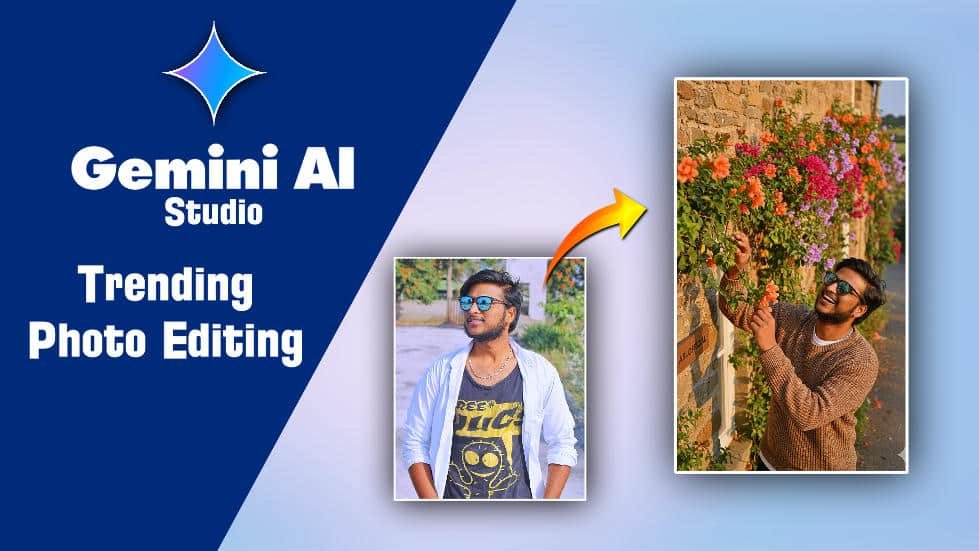
Prompt Here
Hyper-realistic
overhead 9:16 closeup of myself with glasses, playfully leaning against an ivy-covered stone wall of an old countryside
cottage during golden hour. I’m laughing
with my head slightly tilted back, one
hand brushing away a
dangling vine, wearing a textured earth-
tone knit sweater layered over a soft white
t-shirt.
The flowering vines are in full bloom with
SRIKANTH OFFICIAL
orange, magenta, and lavender hues.
softly blurred in the foreground.
