
Table of Contents
-
Introduction
-
What Is Bathukamma — Cultural Significance & Visual Splendour
-
Brief History & Meaning
-
Festival Rituals, Flowers & Visual Elements
-
-
Why Choose Gemini AI for Festival Photo Editing
-
What Is Gemini AI & Its Image‑Editing Features
-
Advantages Over Traditional Photo Editors
-
Current Limitations & Tips to Overcome Them
-
-
Planning Your Bathukamma Photo Shoot
-
Best Times & Lighting Conditions
-
Choosing Composition & Angles
-
Capturing Details: Flowers, Hands, Faces, Immersions
-
-
Workflow: From Raw Image to Final Edits with Gemini AI
-
Step 1: Selecting the Best Raw Photos
-
Step 2: Uploading Images to Gemini
-
Step 3: Prompting for Edits (Text / Conversational Commands)
-
Step 4: Common Editing Tasks (Backgrounds, Lighting, Colours, Retouch)
-
Step 5: Fine‑Tuning, Masking & Layered Edits
-
Step 6: Exporting & File Formats
-
-
Editing Ideas & Styles: Festival‑Vibe Enhancements
-
Emphasizing the Floral Colors
-
Highlighting Motion & Movement (Dance, Clapping, Circles)
-
Soft Glows, Light Leaks & Dreamy Effects
-
Dramatic Contrast, HDR, or Cinematic Looks
-
Combining Multiple Frames (Photo Blends / Overlays)
-
-
Case Studies / Example Edits
-
Example 1: Women around Bathukamma — Enhancing Unity & Harmony
-
Example 2: Close‑ups of Flower Layers & Texture
-
Example 3: Immersion Scenes (Water + Reflections)
-
-
Tips & Best Practices
-
Preserve Skin Tones & Natural Look
-
Avoid Overediting — Keep Cultural Authenticity
-
Using Local Context: Telangana Motifs, Borders, Text Overlays
-
Backup Originals & Use Versioning
-
Ethical Considerations & Respecting Worship Images
-
-
Promoting Your Edited Photos on Blog / Social Media
-
Optimising for Web & Mobile
-
Crafting Captions & Cultural Narratives
-
Using Hashtags, Geotags & Festival Tags
-
Encouraging Engagement (Before/After, Carousel Posts)
-
-
Troubleshooting Common Issues
-
Background Bleeding or Halo Effects
-
AI Misplacing Objects / Artefacts
-
Loss of Flower Detail
-
Over‑smoothing of Textures
-
Future Trends: Gemini & AI in Cultural Photography
-
What’s Coming Next in Gemini / Google AI
-
Integration with Video & Motion (Animating Photos)
-
Generative Edits, Style Transfer & Mixed Media
-
Conclusion
1. Introduction
The Bathukamma festival of Telangana is not only a celebration of life, nature, and feminine spirit, but also an extraordinary visual spectacle. Every year, colourful floral stacks are arranged, women dance in circles, sing traditional songs, and immerse their Bathukammas in water bodies with devotion and joy. For photographers and content creators, such scenes offer rich imagery — but they often also present challenges in lighting, colour balance, crowd composition, and maintaining cultural authenticity.
In this article, we’ll dive deep into how you can use Gemini AI’s photo editing capabilities to transform your raw Bathukamma festival photos into stunning visuals worthy of your blog or portfolio. Whether you’re a beginner with AI tools or an experienced editor looking to add festival flair, this guide walks you through every step — from planning the shoot to crafting the final export.
Let’s begin by understanding the festival itself and why it provides such beautiful visual opportunities.
2. What Is Bathukamma — Cultural Significance & Visual Splendour
2.1 Brief History & Meaning
-
Bathukamma (literally “Mother Goddess come alive”) is a floral festival celebrated predominantly in Telangana, India. Wikipedia+2Telangana Tourism+2
-
It is observed for nine days, starting from Mahalaya Amavasya (Pitru Amavasya) and culminating in Saddula Bathukamma before Durgashtami. Telangana Tourism+3bhoopalapally.telangana.gov.in+3Telangana Tourism+3
-
The festival represents the symbolic connection between women, nature, earth, water, and the life cycle. Hyderabad District+1
-
The ritual includes arranging colourful seasonal flowers in concentric layers to build the Bathukamma, singing folk songs, dancing around it, and on the final day, immersing it in water. Hyderabad District+3Telangana Tourism+3Telangana Tourism+3
2.2 Festival Rituals, Flowers & Visual Elements
These are the key visual motifs you’ll find in Bathukamma festival scenes:
-
Floral Stacks / Concentric Layers: The central Bathukamma is made from various seasonal flowers (gunuka, tangedu, banti, chemanti, etc.) arranged in circular tiers. Telangana Tourism+2Telangana Tourism+2
-
Women in Traditional Attire: Women dress in sarees (or Langa Voni / half sarees) and wear ornaments, often gathering in groups, singing and clapping. Telangana Tourism+3bhoopalapally.telangana.gov.in+3Telangana Tourism+3
-
Dance & Movement: Women dance around the Bathukamma in circles, clapping in rhythm to folk songs (e.g., Uyyaala, Gouramma). Telangana Tourism+2Telangana Tourism+2
-
Courtyards, Rangoli & Decorations: The space around the Bathukamma may have rangoli (muggulu / kolam), decorations, floor designs, and lit surroundings. Telangana Tourism+1
-
Water Bodies & Reflections: On the final day, Bathukamma is immersed in ponds or rivers, creating water reflections, ripples, and transitional light effects. Telangana Tourism+1
-
Flower Petals, Leaves, Droplets: Close-ups reveal details of petals, veins, droplets, texture, and occasional wind-blown motion. These microelements can be highlighted in editing.
As you set out to capture images, keep these visual motifs in mind. Your editing with Gemini AI will build upon these strong visuals to bring out the festival’s spirit.
3. Why Choose Gemini AI for Festival Photo Editing
3.1 What Is Gemini AI & Its Image‑Editing Features
-
Gemini is a multimodal AI platform by Google with native AI image editing capabilities. The app allows you to upload real photos and apply edits—changing backgrounds, replacing objects, adding elements, etc., blog. Google.e
-
Through conversational prompts or textual commands, Gemini can perform many editing tasks without needing manual slider adjustments. google
-
Gemini is designed to “understand” your prompts and context to preserve subjects, textures, and features while applying stylistic transformations.
3.2 Advantages Over Traditional Photo Editors
-
Speed & Ease: You can issue prompts like “brighten background” or “remove distraction on side,” and Gemini handles the heavy lifting.
-
Contextual Awareness: Because it’s AI, Gemini can “understand” what’s a person vs. a flower vs. background and act accordingly.
-
Non‑destructive Edits & Undo: Many AI editors preserve original data, allowing you to revert or tweak.
-
Accessibility for Non‑experts: You don’t need in-depth knowledge of curves, masks, layers—prompting can suffice for many tasks.
-
Creative Augmentation: You can experiment with stylisation, dreamy effects, overlays, or artistic edits with simple commands.
3.3 Current Limitations & Tips to Overcome Them
-
Artefact & Edge Issues: AI might produce haloing or unnatural edges, especially around fine floral structures. Always review edges and correct.
-
Over‑smoothing: Skin tones and textures may become plastic-like; intersperse original texture retention with AI changes.
-
Misinterpretation: Gemini may misinterpret your prompt (e.g., change a flower to something else). Be precise in your prompt language.
-
Resolution Constraints: Some AI tools limit output resolution; ensure Gemini supports your desired export size.
-
Cultural Sensitivity & Authenticity: Be mindful not to distort traditional visuals (flowers, faces, worship symbols) in the pursuit of aesthetics.
With this context, let’s now move from planning captures to editing workflows.
4. Planning Your Bathukamma Photo Shoot
Good editing starts with good raw capture. Gemini AI will work best when your input photos are high-quality and well-composed.
4.1 Best Times & Lighting Conditions
-
Golden Hour & Soft Light: Early morning or late afternoon offers soft, warm light—ideal for floral colours and skin tones.
-
Avoid Harsh Midday Sun: Strong overhead light casts deep shadows and can wash out colours, making editing harder.
-
Overcast or Diffused Light: A slightly cloudy day acts as a natural diffuser, reducing glare.
-
Use Reflectors / Bounce Cards: In crowds, small reflectors can help fill shadows on faces.
-
Backlight for Rim Glow: Position the sun behind the subject to create rim lighting on hair or petals — in editing, you can accentuate that glow.
4.2 Choosing Composition & Angles
-
Low Angles: Shooting from a lower angle gives grandeur to the Bathukamma structure against the sky.
-
Top / Bird’s Eye Views: Look down into the floral layers for symmetry and colour layering.
-
Leading Lines & Circular Motion: Use the circles women form around the Bathukamma to lead the viewer’s eye inward.
-
Rule of Thirds & Golden Ratio: Position key elements (the Bathukamma, a face, a hand) off-centre for dynamic composition.
-
Frame Within Frame: Use doorways, arches, leaves, or dancers to frame the central motif.
4.3 Capturing Details: Flowers, Hands, Faces, Immersions
-
Macro Shots of Petals: Focus tightly on the textures and colour gradients of petals.
-
Hands Arranging Flowers: Capture the act of making Bathukamma — fingers placing petals, layering motion.
-
Expressions & Rituals: Faces singing, eyes closed, devotion — these human moments enhance narrative.
-
Immersion Moments: The plunge into water, reflections, ripples—these are dramatic. Use a fast shutter to freeze motion.
-
Motion Blur / Panning: For dancing women, try a slight intentional motion blur to convey movement.
Once you have a collection of raw images, you’re ready to bring them into Gemini AI.
5. Workflow: From Raw Image to Final Edits with Gemini AI
Here’s a step‑by‑step workflow you can adopt (and adapt) as you use Gemini to make festival images shine.
5.1 Step 1: Selecting the Best Raw Photos
-
Choose images with strong composition, sharp subjects, and balanced exposure.
-
Avoid frames with glaring waste background distractions unless you plan to remove them.
-
Keep variants—some for close-up, some for wide, some for detail, some for crowd.
5.2 Step 2: Uploading Images to Gemini
-
Use the Gemini app or web interface (if available in your region) and upload your selected raw files. Blog. Google
-
Make sure the format (JPEG, RAW, HEIC, etc.) is supported.
-
Optionally, start with a backup copy so you preserve originals.
5.3 Step 3: Prompting for Edits (Text / Conversational Commands)
-
Gemini supports natural language prompts (e.g. “brighten the foreground flowers,” “remove the trash can behind”).Blog. Googlee
-
Be specific: e.g. “increase saturation of orange petals only,” or “bring out rim light on the dancers.”
-
You can chain commands: after one edit, ask for another refinement (e.g. “fix the halo on petals,” “recover shadows on faces”).
-
Use directional phrasing (“on the left,” “bottom right,” “around edges”) to guide object placement.
5.4 Step 4: Common Editing Tasks
Here are editing tasks you’ll often need for Bathukamma photos, and how to prompt or guide them:
-
Background Cleanup / Distraction Removal: Ask Gemini to remove unexpected elements (trash, wires, people in the background).
-
Background Replacement / Blur: For crowded scenes, you might replace or softly blur backgrounds to emphasise the foreground.
-
Colour Enhancement: “Enhance the pinks, yellows, and greens in the floral stack” or “boost contrast in the petals.”
-
Light & Exposure Correction: “Brighten subject by 0.5 EV,” “recover shadows,” “tone down highlights in sky.”
-
Glow / Soft Light Overlay: Add soft diffused glow or light leaks to create a dreamlike effect.
-
Sharpening & Clarity: Ask to sharpen the floral edges or textures while keeping skin smooth.
-
Masking / Selective Edits: Use masks or layers (if available) to apply different edits to separate regions.
-
Edge Refinement / Feathering: After object removal or replacement, refine the edges to avoid harsh boundaries.
-
Reflection & Water Effects: In immersion shots, prompt Gemini to enhance the water reflection or ripple effect.
5.5 Step 5: Fine‑Tuning, Masking & Layered Edits
-
Use Gemini’s masking features (if supported) to isolate petals, faces, backgrounds, and water.
-
Use “undo” or “history” features to backtrack or refine earlier edits.
-
Overlay multiple edited versions (e.g. one with glow, one with punchy colour) and blend in parts for a hybrid edit.
-
Zoom in at 100% to check edges, artefacts, or haloing mistakes, and correct them manually or via prompt.
5.6 Step 6: Exporting & File Formats
-
Export at the highest resolution possible (preferably full-size).
-
Use formats like TIFF or high-quality JPEG if you plan further editing or printing.
-
Keep a web-optimised, smaller version (compressed JPEG or PNG) for blog display.
-
Save multiple versions (e.g. final, alternate style) for A/B testing.
Let’s now look at some style ideas you can try for festival visuals.
6. Editing Ideas & Styles: Festival‑Vibe Enhancements
Here are editing aesthetic ideas tailored to the Bathukamma festival:
6.1 Emphasizing the Floral Colors
-
Pushcolour vibrance selectively (especially yellows, pinks, greens) while keeping skin tones natural.
-
Use colour grading: e.g. warm tone in shadows and soft magenta in midtones to harmonise with flowers.
-
Use split toning: cooler highlights if there’s water or sky, warm tones in petals.
6.2 Highlighting Motion & Movement
-
Use slight motion blur or ghosting on hands or petals to show activity.
-
Duplicate the subject faintly for motion trails (if Gemini allows).
-
Emphasise radial lines emanating from the centre to accentuate dance circles.
6.3 Soft Glows, Light Leaks & Dreamy Effects
-
Use soft glow filters around edges, especially in evening photos.
-
Add subtle light leak overlays (warm, pastel tones) to evoke nostalgia.
-
Use bokeh elements or spark overlays near decorations or lights.
6.4 Dramatic Contrast, HDR, or Cinematic Looks
-
Use high-dynamic-range tweaks to bring out sky, shadows, and highlights.
-
Add a cinematic tone curve (slight “S” curve) and desaturate slight shadows.
-
Use darker vignettes to frame the subject subtly.
6.5 Combining Multiple Frames (Photo Blends / Overlays)
-
Blend a sharp close-up flower texture over a wider group shot for texture layering.
-
Use double exposure with silhouettes of dancers over floral images.
-
Overlay soft textures (like petals falling) to add depth.
Choose a style consistent with your blog’s visual branding, and don’t overdo it — often subtle edits work best.
7. Case Studies / Example Edits
Here are hypothetical (or real, if you try) scenarios to illustrate how you might approach editing with Gemini AI.
7.1 Example 1: Women around Bathukamma — Enhancing Unity & Harmony
-
Start with a wide shot where women circle the Bathukamma.
-
Prompt Gemini: “brighten faces, bring up contrast in petals, reduce crowd distractions in background.”
-
Use masking to enhance hands, faces, and the central structure.
-
Add soft ambient glow from background lighting to unify the scene.
-
Ensure each person is visible; dark shadows on people may be lightened.
7.2 Example 2: Close-ups of Flower Layers & Texture
-
Use a macro capture of a floral tier.
-
Prompt: “boost saturation, sharpen edges, increase micro contrast, remove dust specks.”
-
Ask for subtle depth-of-field blur on petals beyond the focal plane.
-
If a bit of flower is misshapen, ask Gemini to gently correct the edges.
7.3 Example 3: Immersion Scenes (Water + Reflections)
-
Use a photo of women lowering the Bathukamma into water.
-
Prompt: “enhance water reflection, deepen blue tones in water, add ripple effect, accentuate sunset light.”
-
Correct any reflections that misalign (e.g., reversed flowers).
-
Add soft sparkle highlights or shimmer to the water if desired.
-
Balance the colours of the subject and the floral colours don’t get overwhelmed by water tones.
Practising these use cases, you’ll evolve an editing intuition for festival imagery.
8. Tips & Best Practices
8.1 Preserve Skin Tones & Natural Look
-
Even when pushing floral colour, avoid unnatural shifts in skin.
-
Use masking to separate skin from surrounding edits.
-
Regularly compare with the original to ensure realism.
8.2 Avoid Overediting — Keep Cultural Authenticity
-
Don’t remove important cultural symbols (flowers, ritual items) just for aesthetics.
-
Avoid unnatural, surreal edits that distort the festival’s spirit.
8.3 Using Local Context: Telangana Motifs, Borders, Text Overlays
-
Add tasteful Telugu motifs, decorative borders inspired by rangoli or temple design.
-
Use appropriate fonts and colours for text overlays if your blog requires title frames.
-
Include location tags (e.g. “Hyderabad,” “Warangal,” etc.) in the image metadata or overlay.
8.4 Backup Originals & Use Versioning
-
Always keep the original RAW or unedited files.
-
Save incremental versions (v1, v2, v3…) so you can revert.
-
Store exported high-res versions separately from web versions.
8.5 Ethical Considerations & Respecting Worship Images
-
Some images may involve intimate rituals or people in prayer — use them sensitively.
-
If sharing images publicly, consider consent where required, especially for close faces.
-
Avoid edits that may misrepresent or distort ritual meaning.
9. Promoting Your Edited Photos on Blog / Social Media
Once your edits are ready, you’ll want them to reach and engage your audience.
9.1 Optimising for Web & Mobile
-
Compress images for faster loading (e.g. WebP, optimised JPEG) while preserving quality.
-
Use responsive sizes: small (thumbnail), medium (blog post), large (feature).
-
Use alt texts with descriptive, SEO‑friendly captions (e.g. “Women dancing around Bathukamma in Hyderabad, floral festival 2025”).
9.2 Crafting Captions & Cultural Narratives
-
Write captions that explain what the image shows: day of Bathukamma, location, ritual element.
-
Tie in the cultural or symbolic meaning.
-
Use storytelling to connect visuals to readers’ emotions.
9.3 Using Hashtags, Geotags & Festival Tags
-
Hashtags: #Bathukamma, #Telangana, #FloralFestival, #Bathukamma2025, #FestivalPhotography
-
Geotag locations (Hyderabad, local towns).
-
If your blog has other festival posts, cross-link them.
9.4 Encouraging Engagement (Before/After, Carousel Posts)
-
Show before / after slider to reveal your edit transformation.
-
Use carousel posts: raw shot, intermediate, final edit, detail crop.
-
Ask your audience which edit they prefer, or about their memories of Bathukamma.
10. Troubleshooting Common Issues
10.1 Background Bleeding or Halo Effects
-
If you see unnatural halos around petals or figures, refine masks or ask Gemini to “soften edge transition.”
-
Zoom in and manually erase or adjust edges if the AI overcompensated.
10.2 AI Misplacing Objects / Artefacts
-
Occasionally, AI may duplicate or misplace leaves or petals.
-
Identify such artefacts and either remove them or prompt “remove duplicate petal on left.”
10.3 Loss of Flower Detail
-
If AI over-smooths the floral surface, mask that region and reduce smoothing, or sharpen selectively.
-
Use texture-enhancing prompts like “enhance petal micro detail.”
10.4 Over‑smoothing of Textures
-
For skin or fabrics, ask Gemini: “reduce smoothing on fabric texture,” or “retain original texture on saree fold.”
-
Use mixed editing—some region AI, some manual.
By being vigilant and refining in small increments, you can overcome most issues.
11. Future Trends: Gemini & AI in Cultural Photography
11.1 What’s Coming Next in Gemini / Google AI
-
Gemini is expanding its native image-editing capabilities, enabling more complex operations like object replacement, background morphing, and refined local edits. Blog. Googlee
-
Future updates may support higher resolution exports, better edge detection, and faster text-to-edit interactions.
11.2 Integration with Video & Motion (Animating Photos)
-
Gemini now supports turning photos into short video animations through its Veo model—bringing stills to life with movement, sound, and transitions. The Verge
-
In future, you may animate petals falling, ripples in water, or dancer movement—adding dynamic media to your blog or social media.
11.3 Generative Edits, Style Transfer & Mixed Media
-
Expect more generative style transfer—applying artistic filter styles (e.g., watercolour, folklore art) while preserving subject identity.
-
Mixed media edits could allow merging AI‑generated backgrounds with real subject layers.
-
As AI evolves, it may assist you in curating entire festival portfolios or automatically generating photo‑story recaps.
So, mastering Gemini today prepares you for even more creative possibilities tomorrow.
12. Conclusion
The Bathukamma festival offers one of the richest visual tapestries in Indian culture—flowers, feminine energy, devotion, movement, and natural surroundings. With Gemini AI in your toolkit, you can elevate your festival photography to the next level: faster edits, creative flexibility, and refined aesthetics, all while preserving authenticity and cultural integrity.
From planning your shoot to crafting nuanced edits, this guide has walked you through every step. But the real magic comes when you experiment, trust your eye, and tell stories through your images. Use Gemini as your editing partner, not a one-click shortcut, and you’ll discover unique visual voices that resonate with readers.
If you want, I can also help you with ready‑made Gemini AI prompt templates for specific Bathukamma styles, or even produce sample before/after images (if you share your raw photo). Do you want me to prepare a set of prompt templates for your next festival shoot?
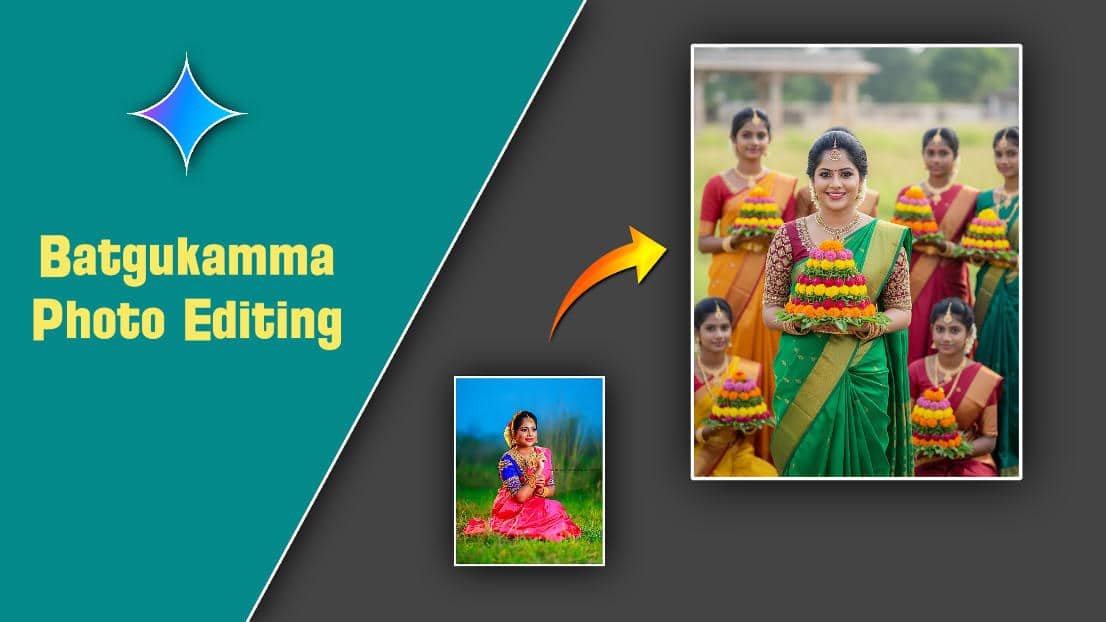
PROMPT HERE
“A vibrant, ultra-realistic, full-body portrait of I uploaded face with 100% accurate. Her modern hairstyle, perfectly set, frames a joyful face looking directly at the camera, beaming smile, highlighting her delicate facial features. She is adorned in traditional Indian attire: a stunning green half saree paired with an intricately designed maroon colour blouse, elegant gold earrings. Her hands gently cradle a vibrant, multi-tiered floral arrangement known as a Bathukamma. The background features several other young girls, also in traditional attire, each holding their own beautiful Bathukamma, creating a festive, communal, and visually rich atmosphere. Natural lighting enhances the vivid colors and textures of the flowers and their traditional clothing, making the scene feel alive and celebratory. This is an 8k portrait, captured at eye-level, emphasizing clarity and detail.”
